Blazor vs WordPress: why C# is my first choice for websites
Most WordPress sites fail Google's speed test on phones, and 11,334 security holes were found in WordPress and its plugins in 2025. Here's why I prefer C#.

By Matt Hodson · · Updated
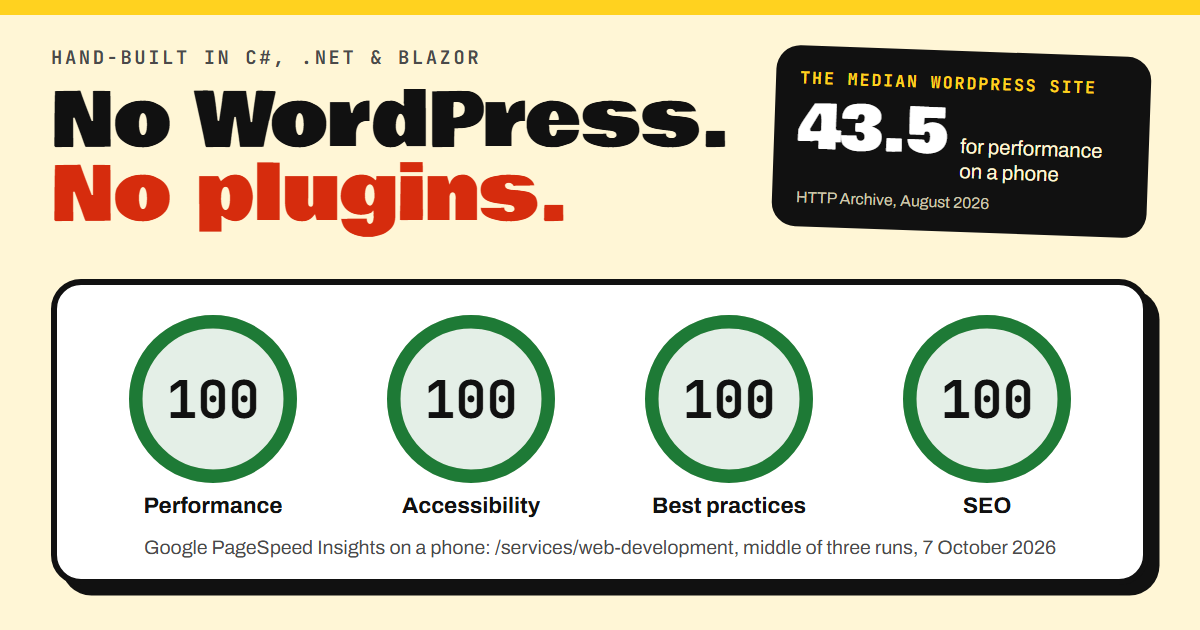
The median WordPress site scores 43.5 out of 100 for performance on a phone. That's from the HTTP Archive, which runs Lighthouse, the test behind Google's PageSpeed Insights, on millions of websites every month.
On 7 October 2026 I put seven pages of this website through PageSpeed Insights on its phone setting, three times each. Taking the middle result for each page, 26 of the 28 scores were a perfect 100 for performance, accessibility, best practices and SEO. The other two were 99 and 98.
That gap comes from how this site is built, and from everything that's been left out. It's written by hand in C#, on Microsoft's .NET platform, with the pages made by Blazor. There's no WordPress, no page builder and not one plugin.
I can build WordPress sites, but whenever the choice is mine, I build in C#. This post explains why. Every figure links to where it came from, and the full list of sources is at the end.
A slow website costs you sales
Speed shows up in the takings. Google commissioned Deloitte to study 37 brands and more than 30 million visits from phones. When a mobile site got just 0.1 seconds faster, retail conversions rose by 8.4% and travel conversions by 10.1%.
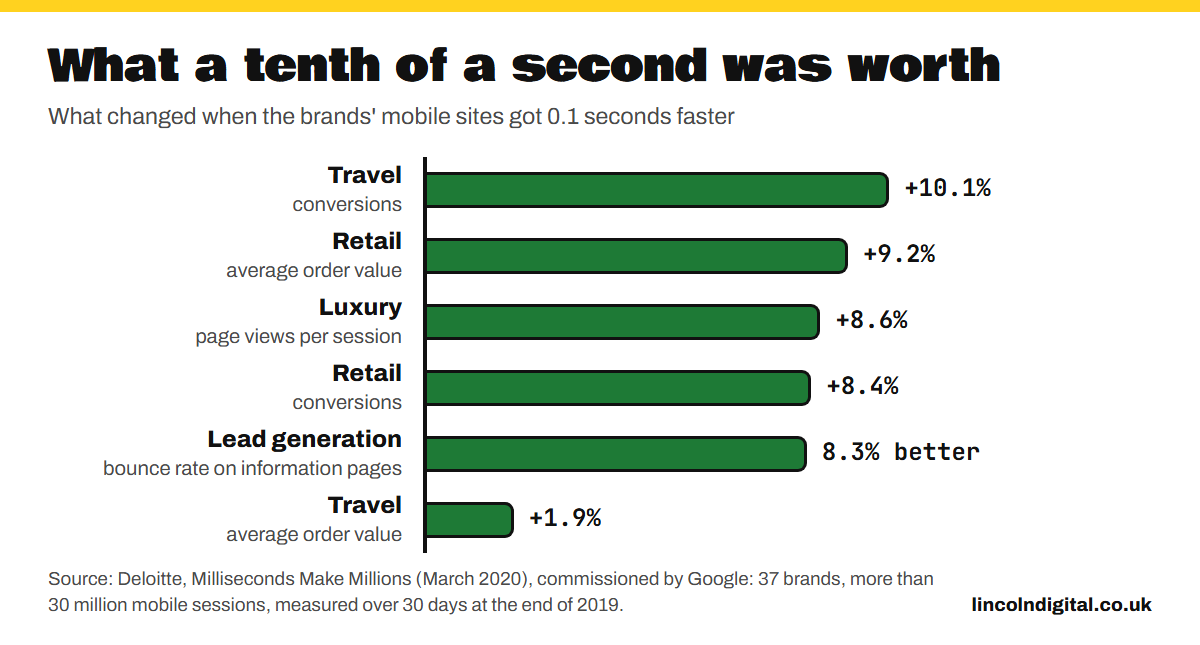
Businesses that have tested it found the same:
- Vodafone ran an A/B test on a landing page. The version whose main content appeared 31% sooner made 8% more sales.
- Rakuten 24, an online shop, tested a page tuned for Google's Core Web Vitals against its original for a month. The tuned page earned 53.37% more revenue per visitor and converted 33.13% more often.
- Swappie, which sells refurbished phones, cut the time its main content took to appear by 55% and made 42% more revenue from mobile visitors.
Google pays attention too. Its own guidance says that "Core Web Vitals are used by our ranking systems". It's honest about the limits: the most relevant page still gets shown, even if it's slow. But for searches where there's lots of helpful content to choose from, Google says a great page experience can contribute to success. If you're one of a dozen firms in town doing the same job, that's you.
Where the weight comes from
Page builders such as Elementor let you design a page by dragging boxes around. It's clever, but every box, slider and animation is more code for your visitor's phone to download and run. Plugins can add their own scripts and styles on top.
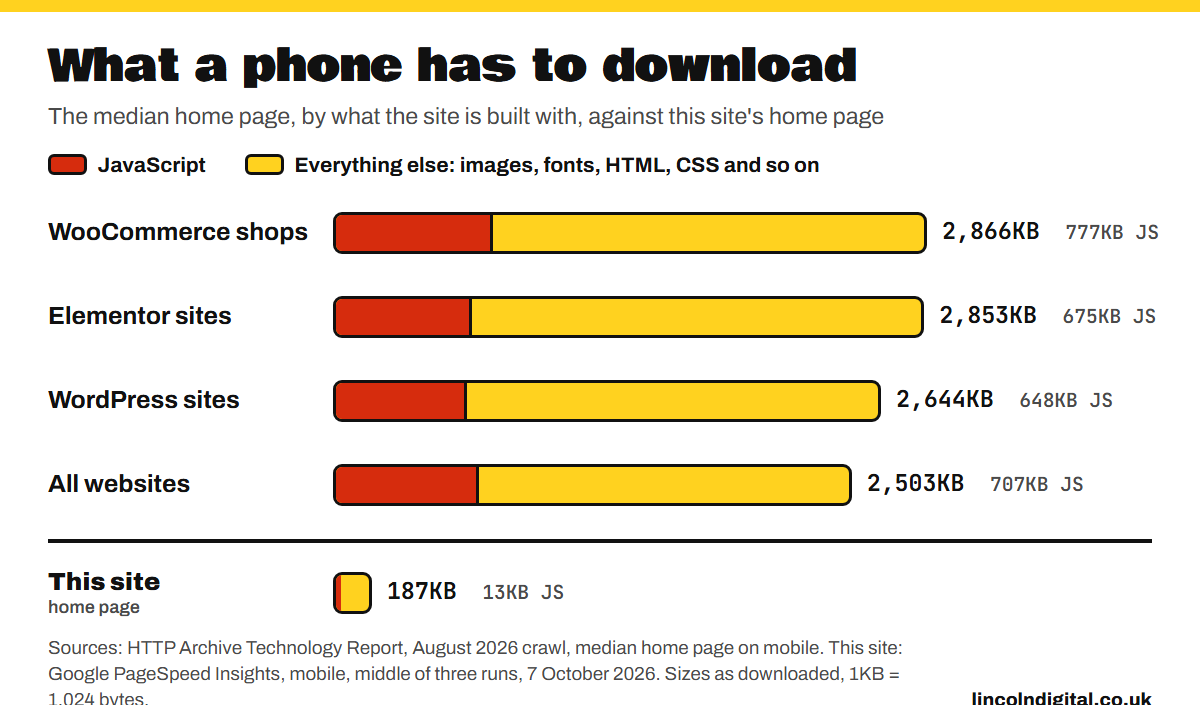
The HTTP Archive measures the home pages of millions of websites every month. In August 2026 the median WordPress home page weighed 2,644KB on a phone, and 648KB of that was JavaScript. Sites built with Elementor came in at 2,853KB, and WooCommerce shops at 2,866KB.
This site's home page weighed 187KB in PageSpeed Insights, with 13KB of JavaScript. That's about a fourteenth of the median WordPress home page, and around a fiftieth of its JavaScript.
JavaScript is the expensive part. An image only has to be downloaded. JavaScript has to be downloaded and then run, and ordinary phones are slow at running it. When the V8 team, who build the JavaScript engine in Chrome, tested a typical website, a median phone took 3 to 4 times as long to run its JavaScript as a high-end one, and a low-end phone more than 6 times as long. While a phone is busy running scripts, the page can't respond when you tap it.
Real visitors feel the difference. Google collects speed data from real Chrome users, and the HTTP Archive breaks it down by what each site is built with. This is how sites did on phones in August 2026:
| Built with | Sites passing Google's Core Web Vitals | Sites with a "good" server response time (0.8 seconds or less) |
|---|---|---|
| WordPress with Elementor | 36.8% | 15.9% |
| WordPress with WooCommerce | 39.5% | 12.7% |
| WordPress, all sites | 48.7% | 23.5% |
| All websites | 53.0% | 45.8% |
Fewer than half of WordPress sites pass, and with Elementor it's just over a third. A lot of the delay happens before the phone receives anything at all. Only 23.5% of WordPress sites have a server that answers quickly enough to meet Google's "good" mark of 0.8 seconds, against 45.8% of websites overall.
Every plugin is another way in
This is the figure that should worry anyone with a plugin-heavy website. In 2025 the security firm Patchstack recorded 11,334 new security holes in WordPress, its plugins and its themes. That's 31 a day, and 42% more than the year before.
WordPress itself is well looked after: the core software had just six, all of them low priority. 91% were in plugins and 9% in themes.
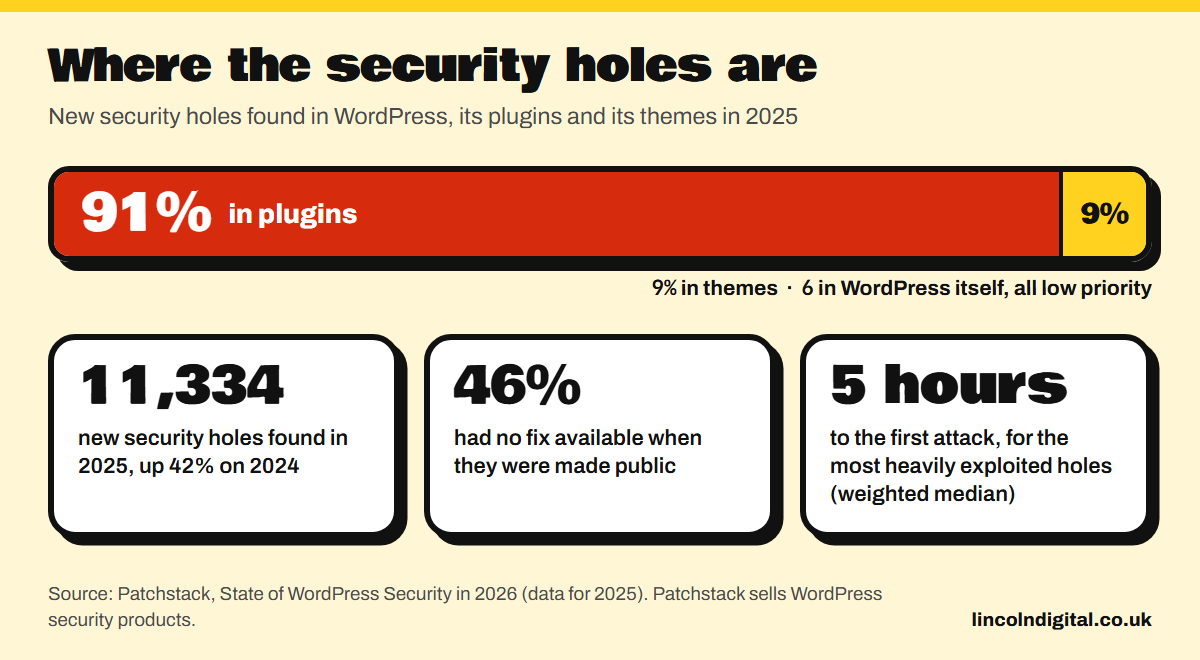
Two more findings make it worse. 46% of the holes had no fix available when they were made public, so there was no update to install. And attackers are quick: about half of the high-impact holes were attacked within 24 hours, and for the most heavily exploited, the weighted median time to the first attack was 5 hours.
Even the updates can't always be trusted. In June 2024 attackers slipped malicious code into five plugins in WordPress.org's own directory. It tried to create a new administrator account, send the details to the attacker and add spam throughout the infected sites. In July 2025, copies of Gravity Forms, a popular paid forms plugin, downloaded from its official website contained a backdoor.
When a website is built from lots of suppliers' code, you're trusting every one of those suppliers.
What getting hacked costs you
- Google warns people off. Search results can show "This site may be hacked" next to your site, and browsers can put up a warning page before anyone reaches it.
- Your site works for the attacker. The 2024 plugin attack above added search engine spam to the sites it infected.
- The law gets involved. If your customers' personal data leaks and that's likely to put them at risk, you must report it to the Information Commissioner's Office, where feasible within 72 hours, and tell the people affected if the risk to them is high.
It isn't rare. The UK government's Cyber Security Breaches Survey, published in April 2026, found that 43% of UK businesses reported a cyber security breach or attack of some kind in the previous 12 months. That's about 612,000 businesses. Only 34% had a policy of installing security updates within 14 days, and on a website that depends on plugins, every plugin is another update to keep up with.
For organisations that suffer a data breach, IBM's 2026 study put the average cost worldwide at a record $4.99 million.
How I'd rather build
Pages arrive finished
Blazor is Microsoft's framework for building websites in C#. I use it in what Microsoft calls static server-side rendering: the server builds each page and sends it as finished HTML, ready to read. Microsoft's documentation explains why that's fast. The page is rendered on the server "without the need to download a large JavaScript bundle".
Google recommends the same approach. Its JavaScript guidance says "server-side or pre-rendering is still a great idea because it makes your website faster for users and crawlers, and not all bots can run JavaScript".
On this site the words and pictures are all in the HTML the server sends. The pages I tested carry 13KB to 15KB of JavaScript each, for things like the mobile menu and the animations.
Compiled and checked
C# is a compiled language. Before anything goes live, the compiler checks that every part of the code fits together, so a whole class of mistakes gets caught on my desk instead of on your website.
Very few moving parts
This website, including the blog, its content editor, the contact form and the free tools, has five third-party packages in its server code, plus the text editor in the admin area. I chose every one of them and can tell you what each does. There's no plugin installer, so nothing gets added to the site unless I add it. Fewer parts means fewer places for holes and fewer suppliers to trust.
Safe by default
- Text stays text. Blazor shows anything typed into a site as plain text, unless the code deliberately says otherwise. That shuts out a common attack where someone sneaks their own code into a page.
- Data never becomes a command. What people type is sent to the database as a parameter, never as part of the query itself. OWASP, the non-profit web security project, puts parameterised queries first among its primary defences against SQL injection.
- Forms are protected. Blazor adds protection against cross-site request forgery automatically, so another website can't submit a form on a visitor's behalf.
- Microsoft keeps it patched. Long-term .NET releases get free support and patches for three years, with updates released on Patch Tuesday, the second Tuesday of the month.
You own it
The code, the design, the content and the domain are yours from day one. Host it with me, or hand it to any C# developer and host it wherever you like.
The proof is this website
Don't take my word for any of this. These are the scores this site's pages got from PageSpeed Insights on a phone, next to the median WordPress site.
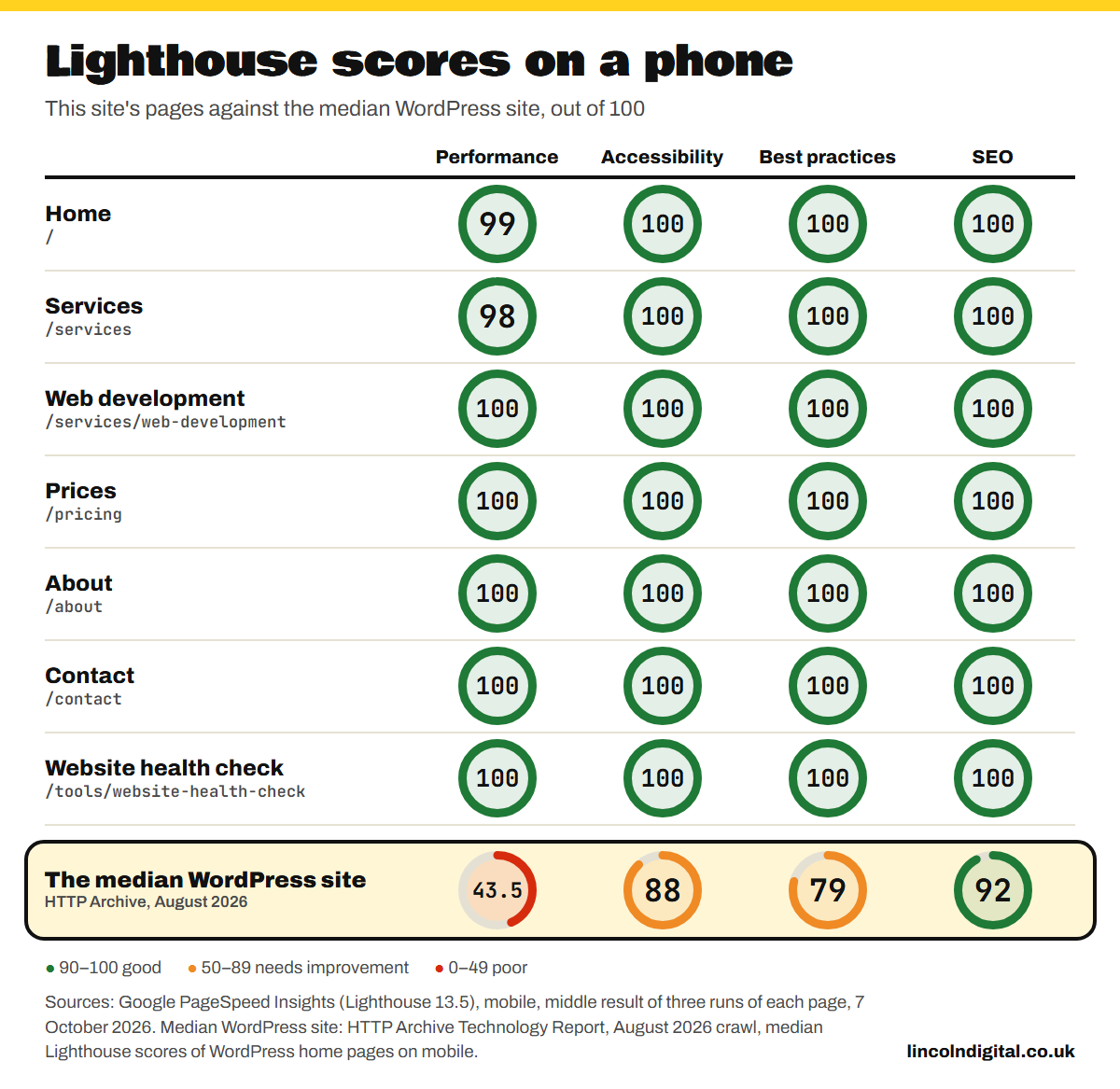
Lighthouse scores move a few points from one run to the next, even on the same page, which is why the chart shows the middle of three. The site is too new to have Google's real-visitor speed data yet, so these are lab tests. You can run the same test on any website at PageSpeed Insights.
What it costs
- More on day one. A hand-built site costs more to start with than a theme and a few plugins. My prices are published, so you can compare.
- No plugin shop. You can't add a feature in an afternoon by installing something. New features get built properly, and quoted for first.
- It still needs looking after. No software is unhackable, and .NET gets security updates like everything else. The difference is how few parts there are to watch.
And to be fair to WordPress, a site with a handful of well-chosen plugins, good hosting and someone keeping it up to date can be quick and safe. The figures above are what typically happens, not what has to.
If you're on WordPress now
Run your site through my free website health check. It reports on speed, phones, security and Google, and tells you what to fix first.
If your site has become more trouble than it's worth, I move WordPress sites to .NET and Blazor. I map every old address to its new home with a permanent redirect, keep the content that ranks and keep an eye on your rankings after launch. Get in touch or call 01522 253027.
Sources
- HTTP Archive, Technology Report: Core Web Vitals, server response, page weight and Lighthouse scores on mobile, August 2026 crawl.
- Deloitte, Milliseconds Make Millions, March 2020, and web.dev's summary of the study, June 2020.
- web.dev, Vodafone: a 31% improvement in LCP increased sales by 8%, March 2021.
- web.dev, How Rakuten 24's investment in Core Web Vitals increased revenue per visitor by 53.37%, 2022.
- web.dev, How Swappie increased mobile revenue by 42% by focusing on Core Web Vitals, September 2021.
- Google Search Central, Understanding page experience in Google Search results, updated September 2026.
- web.dev, Time to First Byte (TTFB).
- V8, The cost of JavaScript in 2019, June 2019.
- Patchstack, State of WordPress Security in 2026, February 2026.
- Wordfence, Supply Chain Attack on WordPress.org Plugins Leads to 5 Maliciously Compromised WordPress Plugins, June 2024.
- Patchstack, Malware Found in Official GravityForms Plugin Indicating Supply Chain Breach, July 2025.
- Google Search Help, Why is my site labeled as dangerous in Google Search?
- Information Commissioner's Office, Personal data breaches.
- Department for Science, Innovation and Technology, Cyber Security Breaches Survey 2025/2026, April 2026.
- IBM, Cost of a Data Breach Report 2026.
- Microsoft Learn, ASP.NET Core Blazor, Razor components and Blazor forms.
- Google Search Central, Understand the JavaScript SEO basics, updated March 2026.
- OWASP, SQL Injection Prevention Cheat Sheet.
- Microsoft, .NET and .NET Core Support Policy.
- This site's scores and page sizes: Google PageSpeed Insights (Lighthouse 13.5), mobile, 7 October 2026.